/kosuke:automated-qa
/kosuke:automated-qa tests your branch's Testing Checklist in a headless browser against the running app. One tester takes each section, several run at once, and each records a video. You get a QA Report in the Artifacts tab, and the pull request gets a qa: passed, qa: blocked or qa: failed label with a comment.
When to use it
Run it when the agent has finished a change, before you ask for review. Run it again after fixes to test the failed items.
- The session's sandbox runs the app. When the app does not answer, QA tries to repair the environment before it tests.
- The branch needs a Testing Checklist. When there is none, QA writes one first from what the branch changes.
- For the comment, the branch needs an open pull request with the tested code pushed. Without one, QA labels the chat session, and the label reaches the pull request when it opens.
The Testing Checklist
The Testing Checklist lists what to test on your branch, one action and its expected result per item. The agent keeps it current on its own: after each feature or fix in a long turn, and before its final reply, whenever the turn changed how your app behaves. Find it in the session's Artifacts tab as Testing Checklist.
The agent skips changes nobody can see in the app, such as documentation, comments and formatting. When the branch changes nothing you can see, the checklist has no items, and QA reports that there is nothing to test. To add, change or drop an item, or to bring the checklist up to date after you edited code by hand, ask the agent in a message.
When the agent updates the checklist, it adds an item for each finished behavior no item covers, favoring edge cases, errors and recovery over the obvious path. It keeps, updates or removes each existing item. When a change can affect an item, it unticks the item and clears any FAILED or BLOCKED tag, so QA tests it again. Its reply names the items it added, updated, reset and removed. Only QA ticks items or marks them FAILED or BLOCKED.
The checklist is grouped in numbered sections. Each section is one flow, tested from one starting point. Each item has a checkbox, a severity, a stable ID, a label and one line with the action and its expected result.
# Testing Checklist

## 1. Save an announcement

- [ ] **[major] [save-twice-quickly] Save twice without a duplicate**
      Press Save two times quickly. Reload the page. One announcement must show.
| Severity | Use it when the defect |
|---|---|
critical | Breaks a core function, loses data or opens a security hole. |
major | Stops an important feature from working as the user expects. |
minor | Is cosmetic or a rare edge case. |
When a result does not show in the app, such as a database row or a sent email, the item names the check that shows it.
Run it
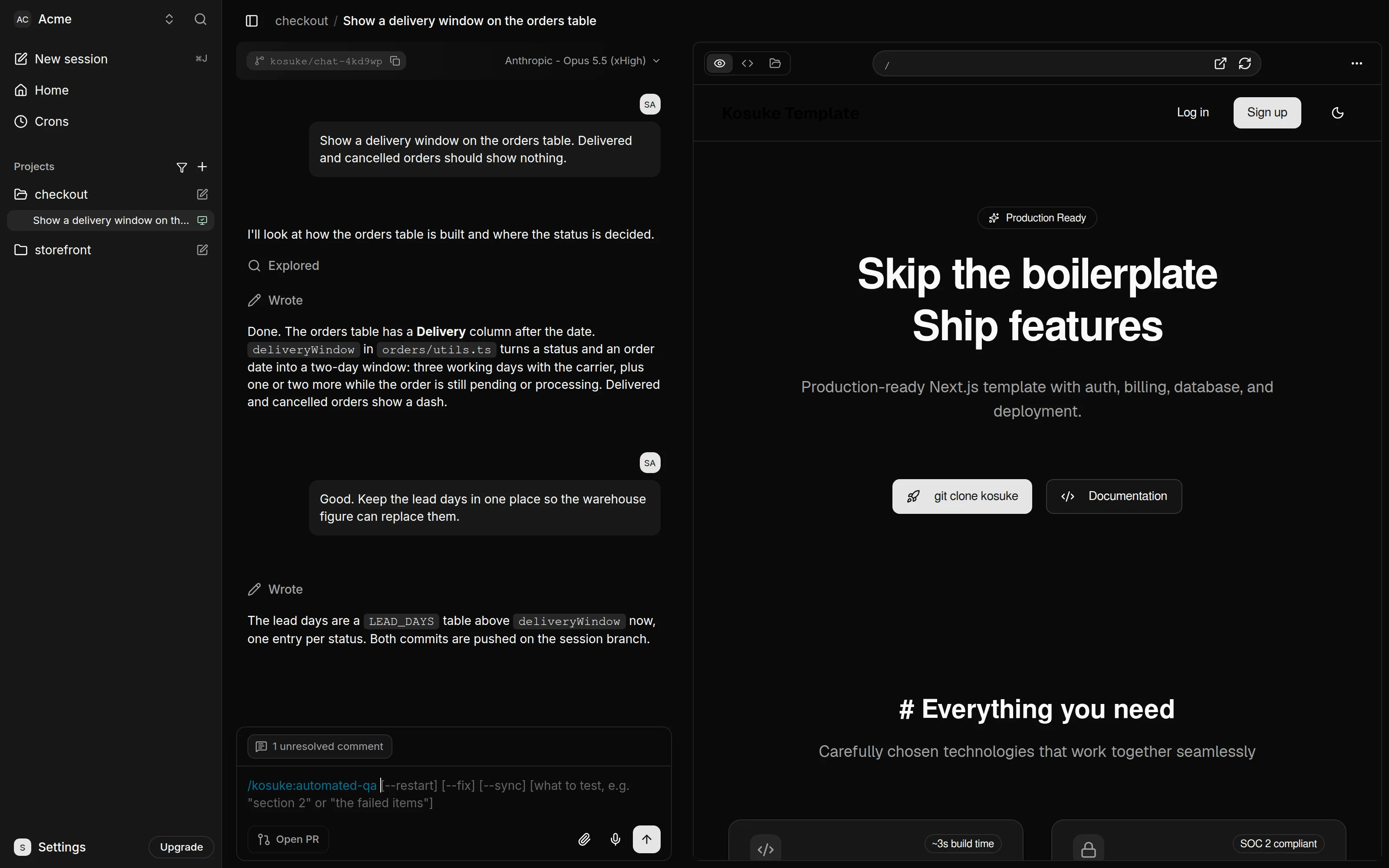
Type /kosuke:automated-qa, or $kosuke:automated-qa in a Codex session.
The Review & QA button in the chat sends /kosuke:automated-qa --fix after /kosuke:adversarial-review --fix, so QA tests the code the review already fixed. Its menu runs QA alone.
| Argument | What it does | Default |
|---|---|---|
| What to test | Tests only what you name, such as section 2 or the failed items. A list of your own behaviors becomes a separate checklist for this run. | The items not tested yet. After the code changed, the failed and blocked items too. On a new sandbox, the failed items too. |
--restart | Starts a new QA Run, tests every item again and starts the QA Report over at v1. | Continues the newest run, or starts a new one when the code changed since |
--fix | Repairs the FAILED items once testing ends, then tests them again. Each time you run it, it makes one repair round. | Off |
--sync | Tests only what a sync merge can affect, and carries the rest from the commit QA last passed on. A run on a merge commit does this without the flag. | Off |
/kosuke:automated-qa
/kosuke:automated-qa section 2
/kosuke:automated-qa --restart
What it does
- It picks the checklist and the items to test.
- It checks that the app answers and reads the Project QA Guide, which says how to open the app, sign in and check its data. When no guide exists, it works one out first, so the first run in a project takes longer.
- It starts one tester per section. Each tester drives a browser, records a video and marks every item it tests.
- It updates the checklist and the QA Report as each section finishes.
- With
--fix, it repairs the failed items and commits one fix per section. A new tester checks the fixed items, and the new footage replaces that part of the section's video. - It labels the chat session and the pull request, and posts a comment on the pull request.
The skill uses kosuke sessions labels edit to save the session verdict from the sandbox.
Each item ends in one of three outcomes:
| Outcome | Meaning |
|---|---|
| Passed | A tester watched the expected result happen. The item is ticked. |
FAILED | A tester watched it not happen. The item is tagged with the reason. |
BLOCKED | The tester could not reach the state the item needs. The item is tagged with the reason. |
What you get
The QA Report is an Artifact titled QA Report: <branch>, headed QA Report v3. A branch has one: every run on the Testing Checklist publishes over it, so you open the same report each time. Its version counts the QA Runs since the last --restart. From v2 on, the Artifacts tab shows it under the title. It has one player over the sections' videos. It lists sections with failed and blocked items first. Select an item to play its footage and read the tester's action and observation.
An item a run did not test keeps the evidence and video of the run that last tested it, marked Tested in v2, until its checklist text changes. --restart publishes v1 with only that run's evidence.
A checklist you gave in the message is saved as qa-checklist-<n>.md, and its run publishes its own report, qa-report-custom-<n>, with no version. It leaves the QA Report alone. The reply gives the counts, each failed and blocked item with its reason, anything a tester noted, and the commits --fix made.
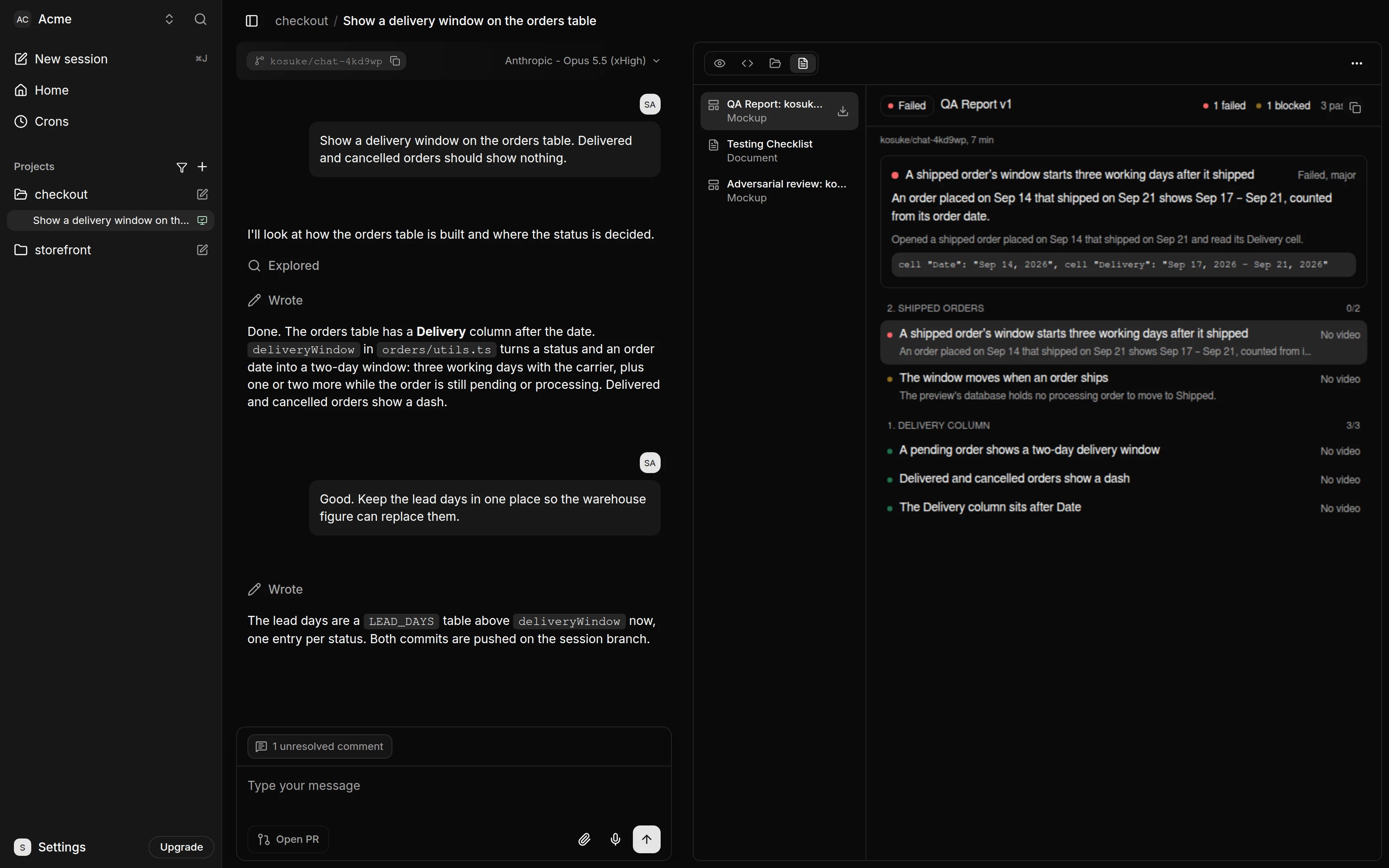
The label counts the items this run tested and any item still tagged FAILED or BLOCKED:
| Label | When |
|---|---|
qa: passed (green) | Every item this run tested passed, or the Testing Checklist has nothing left to test: no item, or every item already passed and no change since marked one for a retest. |
qa: blocked (yellow) | No item failed, and at least one could not reach the state it checks, such as a missing seed user or a token without a permission. In a /kosuke:ship run, a blocked item labels qa: failed instead. |
qa: failed (red) | At least one item this run tested failed, whether or not others were blocked. |
So /kosuke:automated-qa section 1 can label qa: passed while section 2 is still untested. On the chat session's card, the label replaces only the other standard QA verdict labels listed above. Your custom labels stay, including other qa: labels. New project labels use the colors above. Existing project label colors stay as you set them. When marking an open pull request, QA removes every other qa: label there.
With the label, QA posts a comment headed QA: <label> at <commit>. It shows how many items passed out of the total and the failed, blocked and untested counts. It names the QA Report's version, links to the report, the checklist and each section's video, then lists each failed and blocked item with its reason. Each run posts a new comment, and every comment links the same report, which opens at its latest version.
QA labels only when the branch holds the tested code. Everything must be committed, and every result must come from the current commit. With a pull request open, the tested commit must also be pushed. Before a pull request exists, QA puts the label on the chat session as a Session Label, and Kosuke adds it to the pull request when it opens. With a pull request open, a --fix run that commits a repair labels nothing, because QA does not push. To get the label, press Push in the chat footer, then run /kosuke:automated-qa again. It continues the same QA Run, tests the items the fix reset, and labels.
On a new sandbox
When the session gets a new sandbox, Kosuke writes back every artifact of the session, the Testing Checklist and each checklist you gave in a message included. Their ticks and their FAILED and BLOCKED tags come back with them.
The next /kosuke:automated-qa starts a new QA Run on the restored checklist. It tests the items not tested yet and the FAILED items, with --fix too. Ticked items stay ticked, and BLOCKED items wait until you name them.
To run a restored checklist of your own, name it in the message. QA saves a copy as qa-checklist-<n>.md, numbered after the new run.
The QA Runs of the old sandbox do not come back, so a new run never continues one. Their QA Reports and videos stay in the Artifacts tab. A session whose reports were numbered before they were versioned keeps those, and the next run starts the one QA Report at v1.
The Project QA Guide
To test a project, QA has to know how to open the app, sign in and check its data. The first time it tests a project, it works this out and writes it down as the Project QA Guide. The guide appears as an Artifact titled <project> Project QA Guide, and QA saves it to the project's settings. When a later run finds the guide wrong, for example after a sign-in change, QA fixes it and saves it again. The run's reply says when it saved the guide.
A saved guide reaches the chat sessions created after the save, like every other project setting. Sessions already running read the current guide at the start of each QA run.
To read or change the guide yourself, open the project's settings and go to Advanced. Keep secrets out of it: name the environment variable that holds a secret, not its value.