How Kosuke works
Every change in Kosuke happens in a chat session. A session gets its own branch, sandbox and Preview. You talk to the agent in turns, try the result, and end the session with a pull request that you merge on GitHub.
Project (a GitHub repository)
 |
 |-- Deploy ............ main sandbox --> main Preview
 |
 '-- Chat session
      |-- branch ....... its own, cut from the start branch
      |-- sandbox ...... its own copy of your running app
      |-- Preview ...... your app as this branch runs it
      '-- turns ........ your message, the agent's work, its reply
           |
           v
      Open PR --> pull request on GitHub --> merge --> Completed
The project and its deploy
A project is a GitHub repository your workspace imported. It needs one successful deploy before any session can start. The deploy agent reads the repository and works out the services, commands, ports and environment variables your app needs. It saves that configuration and starts the app in the project's main sandbox, which serves the main Preview. Every session's sandbox starts from the saved configuration. See Deploy your project.
A session and its turns
Press New Session and describe the change. Starting the session creates its branch from the start branch and gives it a sandbox, so several sessions can run side by side.
Each exchange with the agent is a turn. You send a message, the agent works in the sandbox, and it replies. While it works, you can watch the Preview and read the diff in the Changes tab. A message you send mid-turn waits in Up next and starts the next turn. You can also steer your own waiting message into a turn you started. If the agent needs a decision, it asks and ends the turn. Your answer starts the next one. See Messages, Up next and steering.
By default the agent commits and pushes its changes at the end of each turn. The Commits preference in Your account and preferences changes that.
A sandbox costs money while it is awake. It pauses when nobody uses it. Sending a message or pressing Start preview wakes it. See Preview and sandboxes.
Review and the pull request
When the change is right, press Open PR. The agent commits any pending work, pushes the branch and opens a pull request against the project's Target Branch. The pull request opens ready for review unless you ask for a draft. A ready pull request moves the session to Under Review. Send a message, or press Resume, to turn the pull request back into a draft and keep working.
With a GitHub Connection, your GitHub account authors the commits and opens the pull request. Without one, the Kosuke App does both. Merge the pull request on GitHub, and the session moves to Completed. See Open a pull request.
Session statuses
The project board has one column per status. Archived sessions are hidden until you show them.
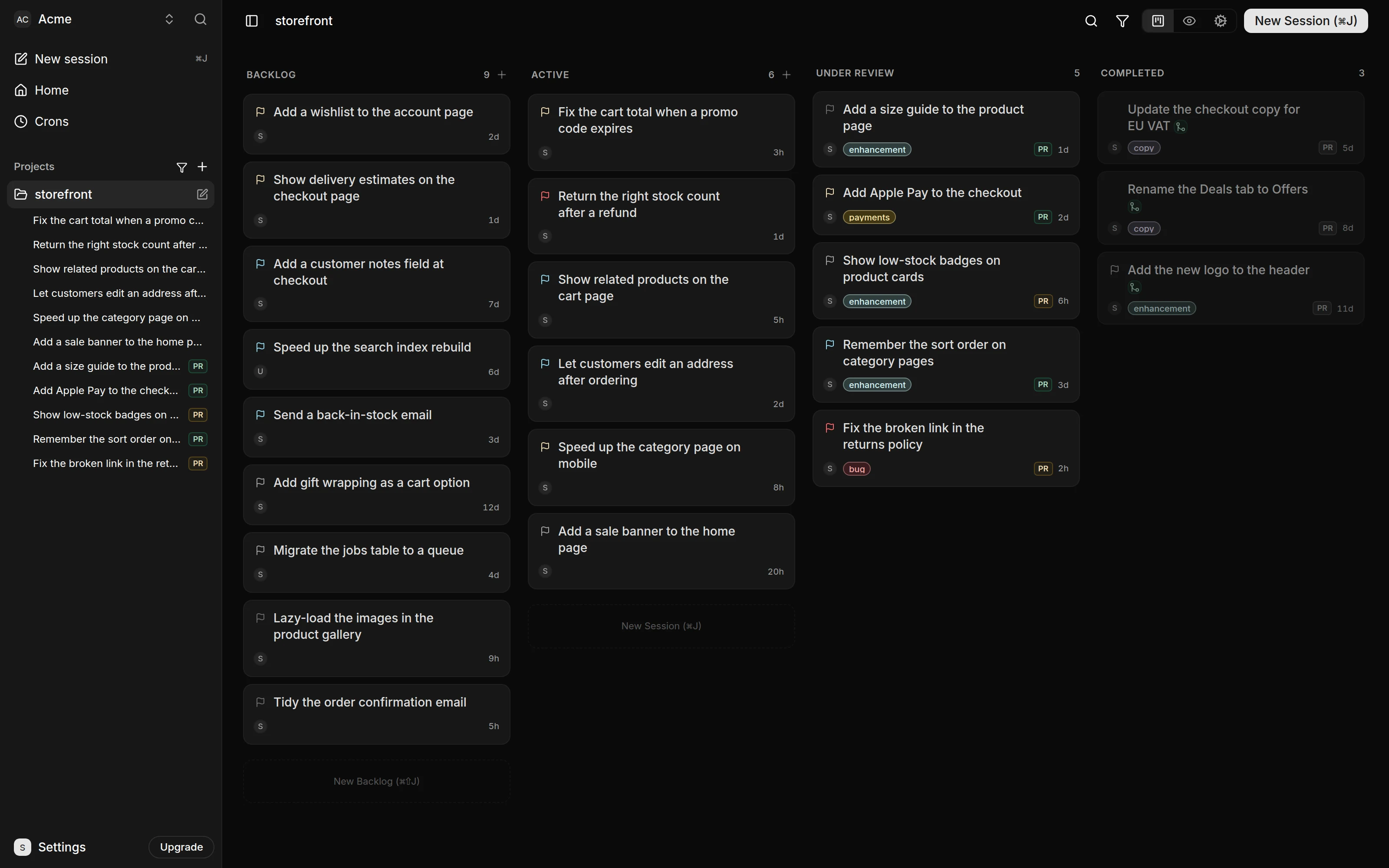
| Status | What it means | How a session gets there |
|---|---|---|
| Backlog | A prompt waiting to start. It has no branch or sandbox yet. | New Session with Backlog selected, or the Lead when you ask it to write a Backlog session. Moving a session back to Backlog deletes its work and chat history. |
| Active | The conversation is open and the agent takes messages. A pull request, if there is one, is a draft. | Starting a new session, or starting a Backlog session. A message to an Under Review session, or Resume. A pull request turned back into a draft on GitHub. |
| Under Review | The pull request is ready for review. A member's message resumes it, and so does Resume. | Open PR, Ready for review on a draft, or dragging the card to Under Review. A pull request marked ready on GitHub. |
| Completed | The work is done. The session has no sandbox and stays in this column. | Merging the pull request on GitHub. A Backlog session can also be completed without code work by dragging it to Completed. |
| Archived | Set aside without a merge. Its pull request is closed and its sandbox removed. | Archive in the card menu, or closing the pull request on GitHub. Restore reopens the pull request as a draft and returns the session to Active. A session that never started returns to Backlog. |
When you import a repository, its open pull requests arrive as sessions. A draft arrives Active, and a pull request that is ready for review arrives Under Review. See Chat sessions and the board for moving sessions between statuses.
Whose credentials run what
A session runs on its Assignee's Subscription, or on the workspace's Credentials when the Assignee has none. Deploys, Cron Runs and sessions filed from Slack always use the workspace's Credentials. So do the sessions the Cron Agent files, until a member reassigns one. AI providers has the full rule.