Test a change in the browser
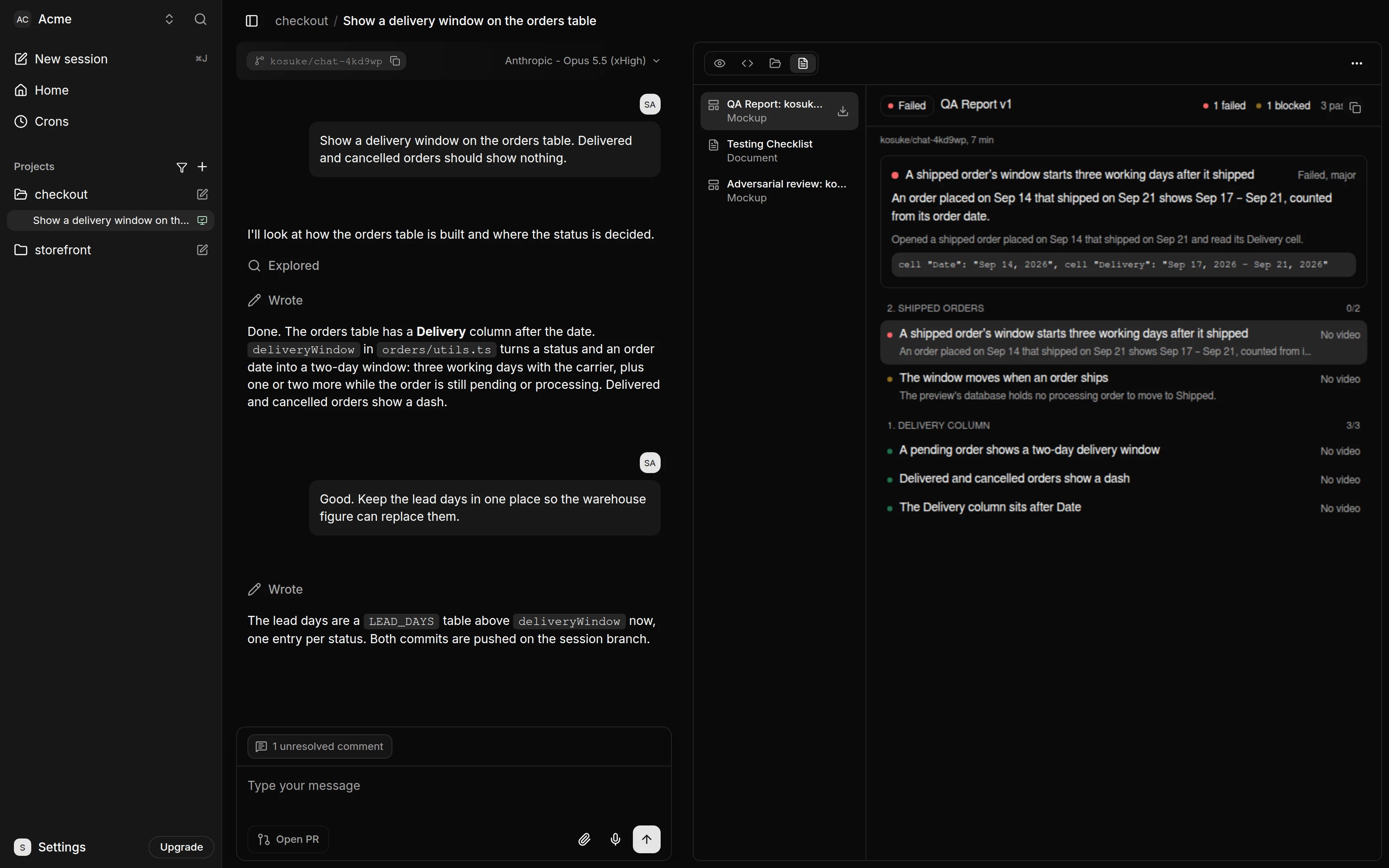
Have the agent test a change in the running app before your team reviews it. The agent keeps a Testing Checklist of what needs checking, and /kosuke:automated-qa tests each item against the Preview. Each run records a video per section and publishes into the branch's one QA Report. Its version counts the runs since the last --restart. The pull request links that report.
Check the checklist
Whenever a turn changes how your app behaves, the agent updates the Testing Checklist of the behavior changed in this chat session, with a severity for each item. It appears as an artifact in the Artifacts tab. Read it, and ask the agent to add or drop items before you run it. If you edited code by hand, ask the agent to bring the checklist up to date.
Run the tests
Send /kosuke:automated-qa.
Testers open the app in headless browsers and work through the checklist, one section each. Each item ends as passed, failed or blocked. The run publishes the QA Report artifact, at the next version, with the results, the reasons for each failure and one video per section.
To test only part of the list, say so after the command, for example /kosuke:automated-qa section 2.
Fix what fails
- Send
/kosuke:automated-qa --fix. The agent repairs the failed items, commits each fix and tests those items again. - Push the fixes with Push in the chat footer, or send
/kosuke:open-pr, which pushes pending work before it opens or updates the pull request. - Send
/kosuke:automated-qa --restartto test every item again on the pushed code.
Each --fix run makes one round of repairs. Send it again for another round.
Put the evidence on the pull request
/kosuke:open-pr, and the Open PR button that runs it, link the QA Report in the pull request description. To add other links, such as a recording, use -e:
/kosuke:open-pr -e https://example.com/recording.mp4
When the pull request is open, a QA run also labels it qa: passed, qa: blocked or qa: failed. qa: blocked means nothing failed but some item could not be tested. It posts a comment with the counts and links to the report and the videos. A run labels the pull request only when everything is pushed and no item was last tested on an older commit. While the pull request is open, a --fix run that commits a repair labels nothing, because the repair is not pushed. Push it, then send /kosuke:automated-qa again to label it.
The links in the pull request open the chat session, so only members of your workspace can follow them.
Share it outside Kosuke
To show the change to someone without a Kosuke account, share the Preview.
- In the Preview tab, press Share preview, then Create share link.
- Copy the link and send it.
Anyone with the link opens the running app. When the session has artifacts, such as the QA Report and its videos, an Artifacts view shows them too. The link works until you press Revoke link. Preview and sandboxes covers sharing.
Next steps
- /kosuke:automated-qa for every option of a QA run.
- The Testing Checklist for how the checklist is written.
- /kosuke:open-pr for the pull request flags.